How to use logic2stick
Hi,
I'm Nguyen Binh Khiem, a Computer Engineering student of VNU-HCM University of Information Technology, Vietnam.
I'm very excited to introduce logic2stick to you. This tool can help you build stick diagrams from Boolean expressions to estimate the area of CMOS layout as well as plan routing more easily. It's also the product of an optional mini project in VLSI course which I participated in 2024.
If you have ever manually sketched stick diagram, you know that unreasonable arrangements of MOS transistors will cause interconnect overlap, which increases the complexity of the circuit. To avoid that, the tool uses Euler's path method to find potential ways to arrange the transistor. It then suggests corresponding diagrams.
Because logic2stick hasn't been able to optimize your Boolean expressions yet, they need to be as simple as possible. There are rules you should know to use the tool effectively below.
Rule 1. Enter complementary expressions. In other words, you enter expression Y' to get stick diagram of Y.
Rule 2. Use uppercase letters (A-Z) for variables, "+" to indicate OR, "." to indicate AND, parentheses "()" to group elements. Don't repeat the letters.
Rule 3.Ensure Euler's paths exist in expressions.
Consider expression A+BC+D. No stick diagram for it because no Euler's path exists, but A+D+BC.
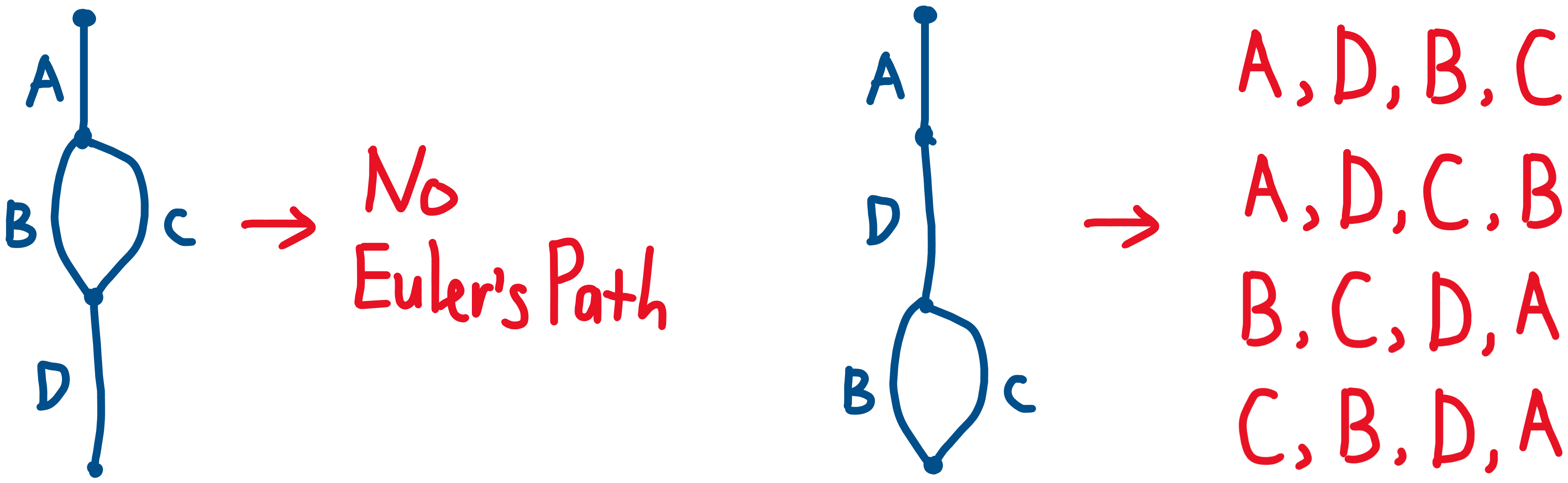
Same to A(B+C)D, you should write AD(B+C).
One more example, E(A+D+BC)F is bad, and of course no stick diagram for it. But EF(A+D+BC).
In short, expressions must be arranged such that Euler's paths exist in both pull-up and pull-down networks. There are a few limitations, though. For example, AB+CD+EF won't work with the current version of the tool.
Thank you for your interest in logic2stick! If you have any questions, discover bugs, or have ideas for improvement, feel free to reach out via email at khiemnb153@gmail.com or LinkedIn https://www.linkedin.com/in/khiemnb153.